
E-signatures for lenders
Your loan forms, signed on a phone in minutes
Upload the PDF forms you already use. AI suggests the fields, you check them once and lock the mapping, and your loan software sends envelopes through one API call. Borrowers sign with a finger, no account needed.
 Test mode is free and needs no card. Then $1.00 per
completed document.
How it works
From PDF form to signed document in four steps
-
Upload your form
Use the PDF you already have. DocuBox keeps its layout and stamps the values onto it later.
-
Check the fields and lock
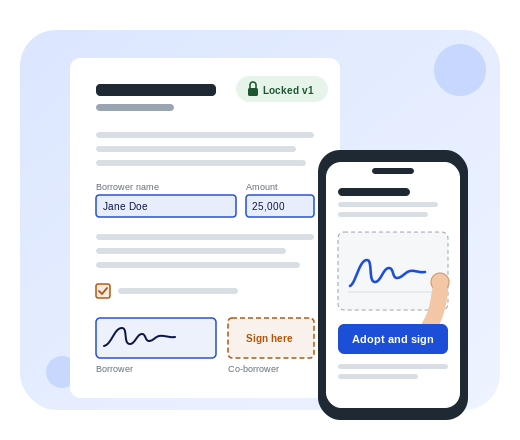
AI suggests text, date, checkbox and signature fields. Adjust them in the editor, assign signer roles and lock the version.
-
Send from your software
Your LOS or CRM creates an envelope with one API call, or your team sends it from the web app.
-
Everyone gets the signed PDF
Signers sign on any device. The completed PDF carries a certificate page, and a webhook tells your system.
Features
Everything a lending team needs, nothing it doesn't
DocuBox does fewer things than general-purpose signature suites, and does them with the evidence a lender expects.
-

Templates you own
Your original PDF stays the source. Values and signatures are stamped exactly where the fields are.
-

AI field mapping
Fields are suggested for you. Fillable PDFs reuse their own form fields, and AI can be turned off.
-

Locked mappings
A confirmed version never changes. Envelopes in flight keep their version when you publish a new one.
-

Multiple signers
Borrowers, co-borrowers, guarantors and loan officers, in parallel or in a set routing order.
-

Finger signing on mobile
Signers open an emailed link, are guided field by field, and draw or type their signature. No app, no account.
-

Audit certificate
Every completed PDF ends with a certificate of who signed, when, from which IP, and the document hashes.
-

REST API
Create, track, void and download envelopes. Idempotency keys make retries from your system safe.
-

Signed webhooks
HMAC-signed events for sent, signed, completed, declined, voided and expired, retried for about a day.
Built for lenders
Made for the way loans get signed
Loan paperwork is the same few forms sent to different people every day. DocuBox is designed around that.
-

Loan agreements and disclosures
Map each form once, then prefill the borrower's name, amount and dates from your system on every send.
-
Co-borrowers and guarantors
Borrowers sign in parallel; the loan officer countersigns once they are done. Each signer gets their own link.
-
Your LOS or CRM in control
Your software sends, tracks and downloads. The web app is for setting up templates and checking status.
-

Costs that follow your volume
No seats and no monthly fee: you pay only for documents that every signer completed.
Security and evidence
Evidence you can check, not just trust
DocuBox records consent, intent and the link between each signature and the document, and is designed to support ESIGN Act and UETA requirements. Whether a signature is enforceable for your use case is a question for your counsel.
-

Hash-chained event trail
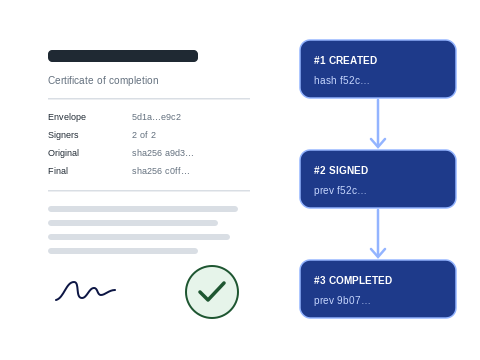
Every event is appended with the SHA-256 of the one before, so a changed or removed event breaks the chain.
-

Certificate of completion
Signers, times, IP addresses, user agents and the hashes of the original and the signed PDF.
-

Public verification
Anyone can check a signed PDF on the verify page. Only its hash is computed; the file is not stored.
-

Write-once storage
Uploaded forms and signed documents are stored under immutable keys and never overwritten.
-

Secrets kept as hashes
API keys and signing links are stored only as SHA-256 hashes; provider keys are encrypted. Passwords use Argon2id.
-

Encrypted in transit, isolated by tenant
TLS everywhere, a strict content security policy, and every record scoped to your organization.
For developers
One call to send, one webhook when it's done
A small REST API with API keys, problem+json errors, cursor pagination and idempotent creates. Test keys give you the full API for free, with watermarked documents.
curl -X POST https://docubox.mpisoft.com/api/v1/envelopes \
  -H "Authorization: Bearer $DOCUBOX_KEY" \
  -H "Idempotency-Key: loan-1001" \
  -H "Content-Type: application/json" \
  -d '{
    "templateId": "0b6e5d7a-…",
    "recipients": [
      { "role": "BORROWER", "name": "Jane Doe",
        "email": "jane@example.com" }
    ],
    "prefill": { "loan_amount": "25,000.00" },
    "callbackUrl": "https://lender.example/hooks"
  }'
FAQ
Questions lenders ask
Do signers need an account or an app?
No. Each signer gets a personal link by email. It opens in the phone's browser, where they fill in their fields and draw or type their signature.
Can I use my existing PDF forms?
Yes, that is the point. Upload the PDF (up to 20 MB and 50 pages), check the suggested fields, and lock the mapping. Encrypted or password-protected PDFs are refused.
What does the AI see, and can I turn it off?
Field detection sends the rendered page images to the AI provider your DocuBox operator configured. The upload page says where they go, and an organization admin can turn detection off. Fillable PDFs are mapped from their own form fields.
Are DocuBox signatures legally binding?
DocuBox is designed to support the requirements of the US ESIGN Act and UETA: signers consent to sign electronically, every action is recorded, and the signed record can be retained and verified. This is not legal advice; ask your counsel whether electronic signatures suit a given document.
How do I know a signed PDF was not changed?
Its SHA-256 is printed on the certificate, sent in the completion webhook and email, and anyone can upload the file on the verify page to check it against our records.
What does it cost?
Test mode is free. Live documents cost $1.00 each, counted only when every signer has completed. See pricing.
Send your first loan form today
Create your organization, upload a PDF and send a test envelope to your own phone. Free, no card.